This is a very straightforward but useful funciton. It is essential that the searched range is ordered.
The LOOKUP function works as follows: =LOOKUP(Search Value, Seach Range, [Result Range])
Search Value: Search Range: Result Range:
Value being sought Range to search for value Range of output value [Optional Argument]
The function will look for the first occurrence of the Search Value.
If a larger value is found before the Search Value, the previous value will be used.
If the first value in the search range is larger than the Search Value, the error #N/A is returned.
If the Result Range is omitted, the Value found in the Search Range is output.
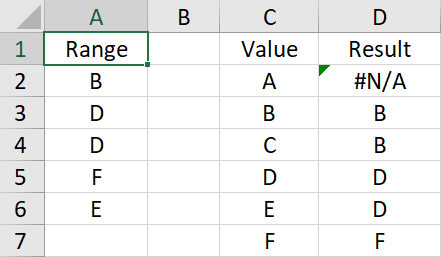
In the examples below the formulae in Column D lookup the values in Column C in the Range A2:A6. The formulae are of the form: =LOOKUP(C2, A2:A6)
Searching for:
A: finds B first and produces error #N/A B: finds B C: find D and shows B D: finds D E: finds F first so shows D F: finds F
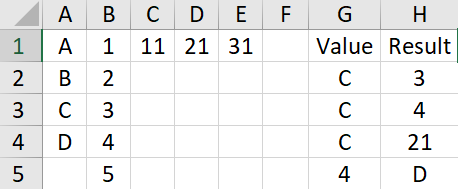
The Result Range does not need to aligned with the Search Range,nor does it need to have the same orientation, nor does it have to come after the Search Range.
In the example below, there are 4 formulae in the range H2:H5: