My first Excel tip is a very simple one, but I think it is the problem I’ve been asked about most.
In fact, it took me a while to find out how to do this, looking through the Excel 5 manual (Remember them anyone?)
I eventually found the solution used in the answer to another problem. The question? How do you get excel to show sums of hours greater than 24?
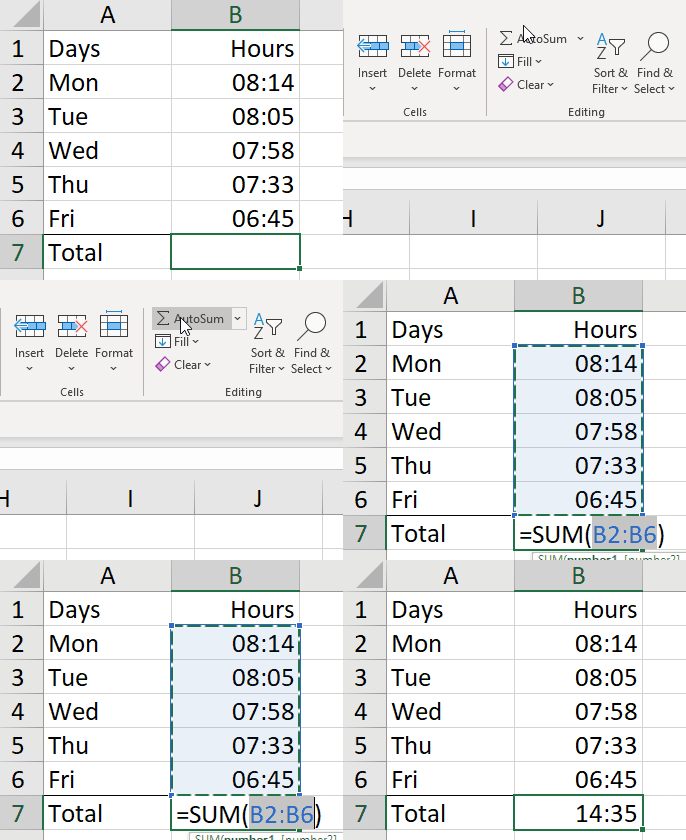
Example: Suppose you wanted to sum the hours worked in a week. We enter all our hours and then use AutoSum to get the total.
14:35? That’s not right is it?
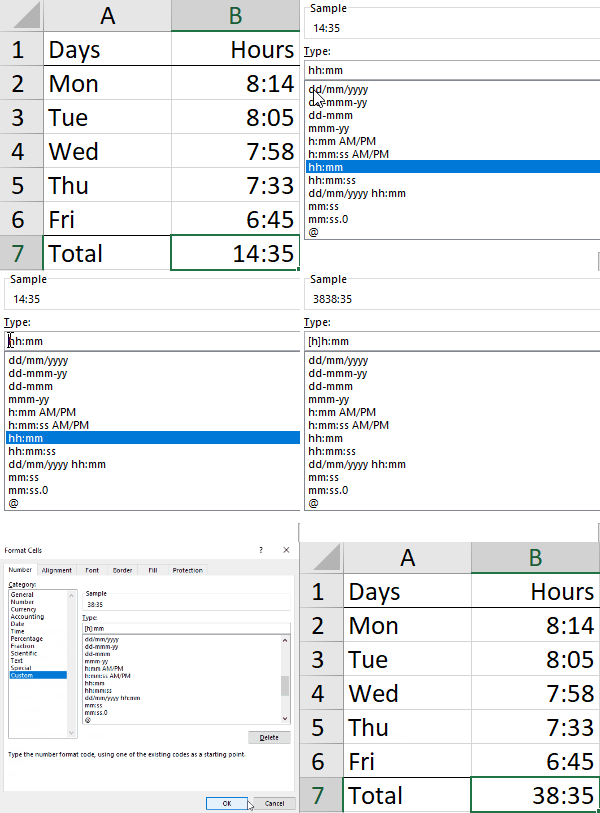
The format Excel has assumed is hh:mm. This will only show hours of the day. Anything over 24 hours becomes a day.
To get the total hours in hours, we need to format the hours in square brackets. (I’m also tidying the entry so that there is no leading zero on entries under 10.)
To solve this issue we need to enter the format as [h]:mm
The output now makes sense!
This method can also be applied to minutes (or even seconds). For example when timing something just over an hour you may want to see total minutes. You would use [m]:ss.0 (This format also includes tenths of seconds).
Simple but very useful and annoying if you don’t know it!